Pods in a cluster
Open a pod from Pods, or from the workload or service that owns it, and its detail arrives in a drawer over the list. Overview is the tab you land on: what this pod is, what it runs, and what it reads.
The drawer is deliberately narrow. The button in its top corner takes the same detail to a full page — no reload, and whichever tab you were on stays the tab you are on. That is the view the screenshots here use, because Config & secrets sits under the container table and the two do not fit a drawer at once.
The Overview tab#
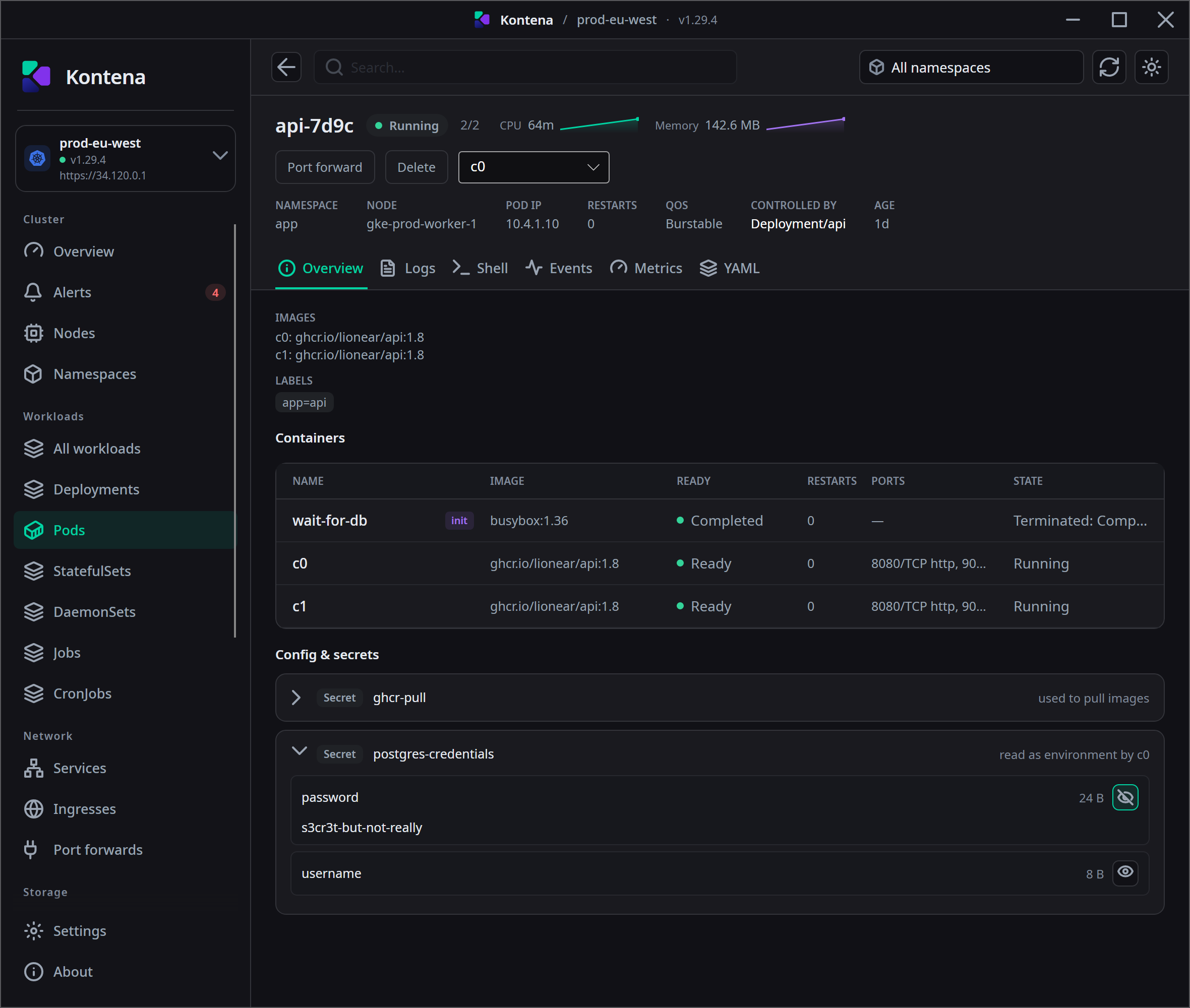
Above the tabs sit the facts that identify the pod — namespace, node, pod IP, restarts, QoS class, what controls it, and its age — with live CPU and memory beside the name. The tab itself then adds:
- Images — what this pod actually runs. A single-container pod shows the image
on its own; with several containers each line is prefixed with the container it belongs to
(
c0: ghcr.io/lionear/api:1.8). - Labels — the pod's own labels, which are also what its owner selects on.
- Containers — one row per container, init containers included, with readiness, restart count, ports and run state.
- Config & secrets — below.
They are in the container table, where their state is the point. Listing them as images too would put a container that has already finished next to the ones actually serving traffic.
Config & secrets#
Every ConfigMap and Secret this pod reads, one row per object, with how it is being used on the right. A pod can use the same object twice — mounted and read as environment — and those stay on the one row rather than becoming two entries for one object.
| The row says | Which means |
|---|---|
mounted as a volume | The object's keys are files in a container. |
read as environment by <container> | A named key becomes an environment variable in that container. |
read whole as environment | Every key becomes an environment variable. |
used to pull images | An image pull secret. Used by the kubelet, not by a container — which is why this one names no container. |
Opening a row#
Rows start collapsed, and the keys of an object are fetched when you open one — not before. A pod carries the names of what it reads, never the contents, so listing this section costs nothing until you ask a specific question of a specific object.
A ConfigMap's values are simply there: there is nothing to protect in a
LOG_LEVEL of info, and a reveal button on one only teaches you to press
reveal without reading. Secret values are masked, behind an eye button per key —
press it to fetch and show that one value.
Hiding a value again — or closing the row — drops it. Nothing is cached, so revealing it a second time is a second read from the cluster.
Reading a Secret's contents is its own permission in Kubernetes, separate from listing pods. A row that names a Secret can therefore still refuse to open; when it does, the row says what came back rather than unfolding onto an empty list.
The other tabs#
Logs, Shell, Events, Metrics and YAML sit beside Overview, per container where that applies. YAML is editable: Apply sends it, Revert puts the cluster's version back.